Inferring a JSON Schema from Sample JSON: What a Generator Can and Cannot Know
Writing a JSON Schema by hand for an existing payload is tedious, so most people start by generating one from a sample. That is a good first step and a poor last one. A generator sees one document; a schema describes every document you are willing to accept. This article covers what inference gets right, what it cannot know, and how to close the gap.
How inference works
The algorithm is a walk over the sample that records what it sees:
- A string, number or boolean becomes
{ "type": "…" }. - An object becomes
type: objectwith one entry inpropertiesper key, and every key it saw is listed inrequired. - An array becomes
type: arraywith anitemsschema inferred from its elements. Simple generators, including the one on this site, use the first element; an empty array gets an unconstraineditems: {}.
{
  "id": 1024,
  "email": "ada@example.com",
  "tags": ["admin"],
  "profile": { "name": "Ada", "newsletter": false }
}{
"$schema": "https://json-schema.org/draft/2020-12/schema",
"type": "object",
"properties": {
"id": { "type": "number" },
"email": { "type": "string" },
"tags": { "type": "array", "items": { "type": "string" } },
"profile": {
"type": "object",
"properties": {
"name": { "type": "string" },
"newsletter": { "type": "boolean" }
},
"required": ["name", "newsletter"]
}
},
"required": ["id", "email", "tags", "profile"]
}What one sample cannot tell you
- Is id always an integer?
- Is email required to be an email?
- Can tags be empty? Are values from a fixed set?
- Which keys are optional?
- Are extra keys allowed?
| Question | What a generator does | What you probably want |
|---|---|---|
| Optional fields | Marks every key it saw as required | Remove optional keys from required |
| Integer vs. number | Emits number (JSON has one numeric type) | integer for ids and counts |
| Null | Emits type: null for a null value | A union such as ["string", "null"] |
| Fixed sets of values | Any string | enum or const |
| String formats | Any string | format: email, date-time, uri, or a pattern |
| Ranges and sizes | No limits | minimum, maxLength, minItems, uniqueItems |
| Unknown keys | Allowed (the JSON Schema default) | additionalProperties: false where strictness matters |
Mixed arrays deserve a special mention. If the sample is [1, "two", null], a generator that looks at the first element will say "array of numbers", and valid data will fail. For arrays that are really tuples, use prefixItems; for arrays of alternatives, use anyOf inside items.
Tightening the result
Here is the same schema after ten minutes of review. Every change encodes a decision the sample could not:
{
  "$schema": "https://json-schema.org/draft/2020-12/schema",
  "type": "object",
  "properties": {
    "id": { "type": "integer", "minimum": 1 },
    "email": { "type": "string", "format": "email" },
    "tags": {
      "type": "array",
      "items": { "enum": ["admin", "editor", "viewer"] },
      "uniqueItems": true
    },
    "profile": {
      "type": "object",
      "properties": {
        "name": { "type": "string", "minLength": 1 },
        "newsletter": { "type": "boolean", "default": false }
      },
      "required": ["name"],
      "additionalProperties": false
    }
  },
  "required": ["id", "email"],
  "additionalProperties": false
}
A practical trick: generate from several real samples, not one. A key that is missing from some of them is optional; a field that is sometimes a string and sometimes null needs a union. Three or four production payloads reveal most of what a single hand-picked example hides.
A note on drafts
The generator here emits draft 2020-12. If your validator or framework still expects draft-07, the differences you are most likely to meet are small:
| Purpose | draft-07 | 2020-12 |
|---|---|---|
| Reusable definitions | definitions | $defs |
| Tuple validation | array form of items | prefixItems |
| Extra tuple elements | additionalItems | items (after prefixItems) |
Also note that format is an annotation by default in 2020-12. Validators only enforce it when you turn format assertion on, so do not rely on format: email until you have checked your validator's setting.
Validate the schema against real data
A schema is only trustworthy after it has rejected something. Run it against known-good and known-bad samples:
import Ajv2020 from 'ajv/dist/2020';
import addFormats from 'ajv-formats';

const ajv = new Ajv2020({ allErrors: true });
addFormats(ajv); // enables "email", "date-time", ...
const validate = ajv.compile(schema);

if (!validate(data)) console.log(validate.errors);from jsonschema import Draft202012Validator
validator = Draft202012Validator(schema)
for error in validator.iter_errors(data):
print(list(error.path), error.message)Getting the first draft
The JSON Schema Generator on this site produces the kind of first draft shown at the top of this article. Here it is with the same sample document.
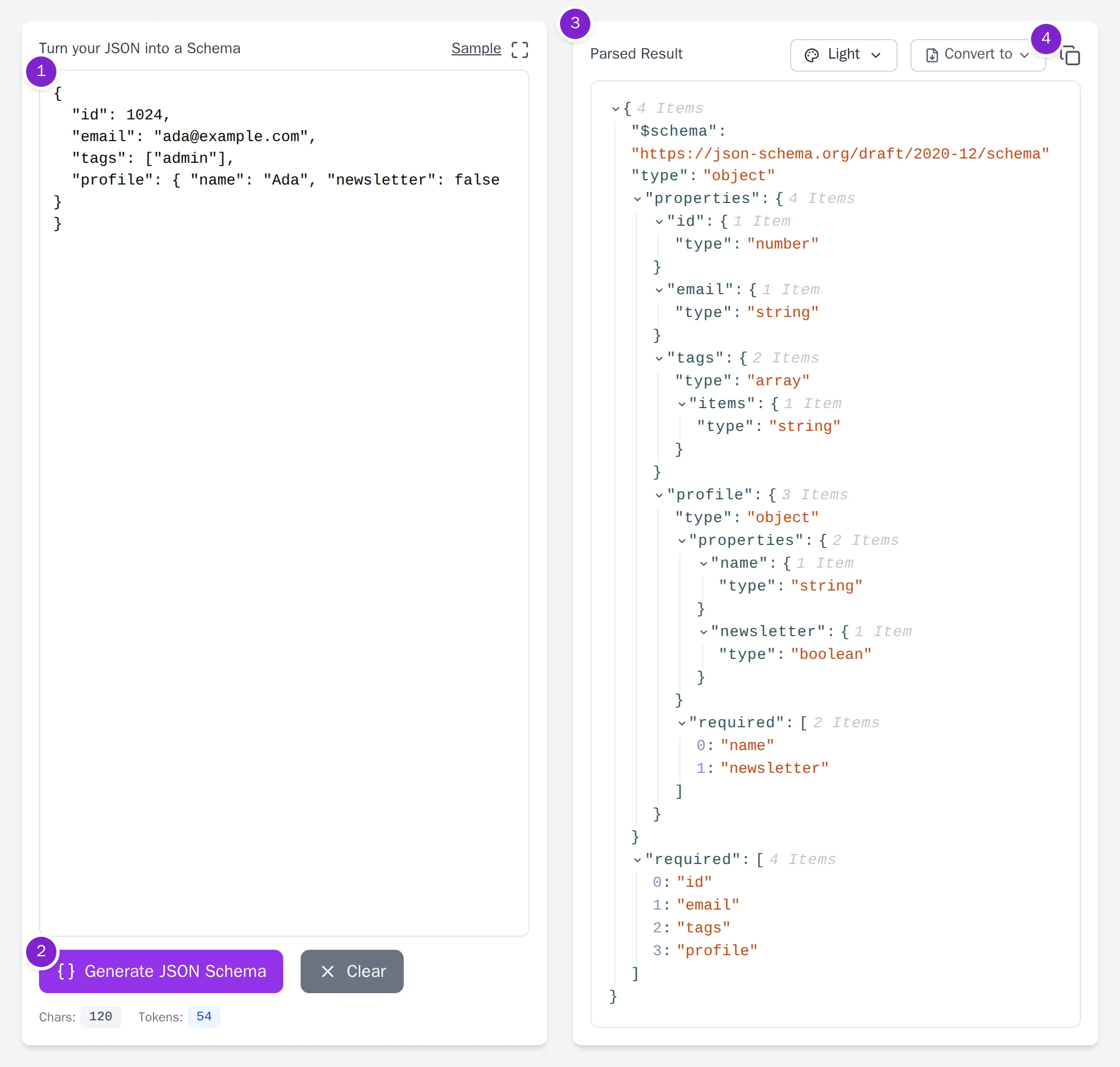
- Step 1: Paste one representative document. Pick a record that has every optional field filled in, because the generator can only describe what it sees.
- Step 2: Click Generate JSON Schema.
- Step 3: Review the schema tree. Every key in the sample appears under
propertiesand inrequired. That is the part to edit first, as described in the sections above. - Step 4: Export the draft. Convert to downloads the schema as a
.jsonfile, and the copy icon puts it on the clipboard so you can paste it into your editor and start tightening it.
Once you have a schema, the reverse direction is useful for documentation and tests: see generating sample JSON from a schema.
Summary: let the generator do the typing, then spend your time on required, numeric types, enums, formats and additionalProperties. Those five decisions are where a schema earns its keep.